Keyspan URM-17A AirPort Express Remote Control
Tripp Lite Updated: 2009-01-24 RSS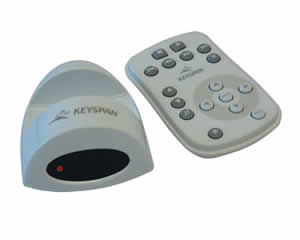
This versatile infrared remote can be used in two ways...
Connect to USB Port on AirPort Express
When used with AirPort Express the Express Remote provides a powerful way to locally control music being streamed from iTunes on a remote Mac or PC.
Connect to USB Port on a Mac or PC
When connected directly to a Mac or PC, the Express Remote allows you to control audio and video media players on your computer in the same convenient way that you now control a TV or VCR. Use the Express Remote with MP3 players, DVD players, audio CD players, TV tuners, presentation software and more.
* Sleek 17 button infrared remote transmits signals up to 40 feet
* Includes key maps for iTunes, MusicMatch, Windows Media Player, WinAMP, QuickTime, PowerPoint and other popular multi-media applications
* Simple control panel allows you to program the remote for use with additional applications
System Requirements
Airport Express:
* iTunes version 4.7 or later (for Mac or PC); AirPort Express firmware 6.1.1 or later; Windows 2000, Windows XP, or Mac OS X 10.3 required for AirPort Express control
Mac:
* An available USB port; Mac OS 8.6 (or later); Mac OS X 10.2.8 or greater
Windows:
* An available USB port; Windows 98/98SE/Me/2000/XP
Battery:
* Remote Control uses two CR2025 (Lythium 3V) batteries (included)
Package Includes
* USB Receiver (UIA-11F Airport Express Compatible version)
* Remote Control (REM-17B)
* remote's Batteries (two CR2025 [Lithium 3V])
* CD with driver software and user guide
* Printed Quick Start Guide
Owner Manual
Related Manuals
Keyspan URM-15T iTunes Remote Control
Keyspan ER-V2 RF Remote Control
Keyspan ER-RF1 FrontRow Remote Control
Logitech 930-000036 Squeezebox Controller
Logitech 915-000035 Harmony One Advanced Universal Remote
Logitech 915-000082 Harmony 510 Advanced Universal Remote
Logitech 966230-0403 Harmony 1000 Advanced Universal Remote
Logitech 966187-0403 Harmony 880 Advanced Universal Remote
Logitech 915-000002 Harmony 670 Advanced Universal Remote
Logitech 966208-0403 Harmony 550 Advanced Universal Remote
Logitech 966193-0403 Harmony 890 Advanced Universal Remote
Logitech 915-000044 Harmony RF Wireless Extender